
Let’s be real for a second. If you are a facility manager, a maintenance supervisor, or running a field service crew, your day probably feels like a game of whack-a-mole. The phone rings, a critical asset breaks down, a technician is lost, and the paperwork piles up. At the center of all this chaos sits one crucial process: work order management. It isn’t just about filling out forms; it is the nervous system of your operations. When done right, it transforms a reactive fire-fighting crew into a proactive, profit-generating machine.
In the past, managing work orders meant a clipboard, a three-part carbon copy, and a lot of hope. Today, we have powerful digital solutions that can schedule, track, and analyze every screw turned and every invoice sent. But here is the secret: software alone won’t save you. You need a strategy. You need to understand the lifecycle, the metrics, and the human element. This guide is your playbook. We are going to break down everything from the basics of creating a work order to the advanced analytics that predict the future. Whether you manage a hotel, a hospital, or a manufacturing plant, mastering work order management is your ticket to less stress and more uptime.
What Exactly is Work Order Management? (And Why You Should Care)
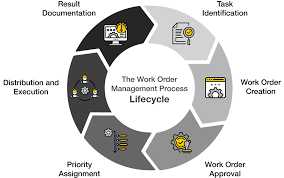
So, what are we actually talking about? A work order is simply an authorization to perform a task. It could be fixing a leaky faucet, servicing an HVAC unit, or painting a wall. However, work order management is the entire ecosystem surrounding that piece of paper. It is the lifecycle: the request coming in, the approval workflow, the assignment to a tech, the tracking of parts, the completion sign-off, and finally, the invoice. Think of it as the operating system for your maintenance department. Without it, you are flying blind, hoping that things get fixed without any proof of what happened or how much it cost.
Why should you care enough to read thousands of words on this topic? Because poor work order management is bleeding your budget dry right now. According to recent industry data, contractors who lack a disciplined workflow often fail to meet schedules, whereas those with a highly consistent change order management process meet or exceed schedules the vast majority of the time . That is a massive competitive gap. When you manage work orders effectively, you stop repeating repairs because the tech actually logged the root cause. You stop wasting hours hunting for the history of an asset. You essentially stop stepping on the gas while the emergency brake is on.
The Shocking Cost of Doing Nothing (The Reactive Trap)
Let’s paint a scary picture. Imagine walking into a facility where there is no system. Requests come in via sticky notes, voicemails, and hallway conversations. The maintenance team spends their mornings just figuring out where to go. This is what experts call the “reactive trap,” and it is expensive. When you rely on chaos, your assets suffer. A small lubrication issue turns into a blown motor. A simple electrical short turns into a fire hazard. You end up paying overtime rates for emergency fixes that could have been scheduled for a Tuesday afternoon.
One facility manager reportedly handled an astronomical number of work orders in a single day—most of which could have been automated . Imagine reclaiming that time. A reactive environment kills morale. Techs feel like they are putting out fires, not building skills. Finance hates the unpredictability of emergency parts purchases. A robust work order management system acts as your shield against this chaos. It automates the repetitive stuff, sets up preventative maintenance schedules, and alerts you before a warranty expires. It shifts your team from constantly running around with a bucket to calmly walking with a plaThe Anatomy of a Perfect Work Order (Key Elements)
Not all work orders are created equal. A vague instruction like “Fix the thing in room 12” is a recipe for disaster. For work order management to work, the document itself must be a tool of clarity. First, you need asset identification. Exactly which machine? What is the serial number? GPS coordinates? Without this, a technician might bring the wrong part or go to the wrong building. Second, you need scope of work. This is the “why” and the “how.” Is this an emergency? Is it a routine inspection? Attachments like photos or PDF manuals are gold here.
Third, and most critically in 2026, is the priority and safety protocols. A digital work order management system should flag safety hazards immediately. Does the tech need a harness? Lockout-tagout training? The best systems also track the parts inventory. If the work order requires a specific filter, the system should check stock in real-time. Finally, a perfect work order includes a feedback loop. It isn’t done until the technician logs their hours, notes the resolution, and the requester signs off digitally. This closes the loop and builds a historical database for future maintenance decisions.
Core Features of Modern Work Order Management Software
You might be thinking, “Can’t I just use a spreadsheet?” You can, but you will hate your life by the third week. Modern work order management software has evolved into a beast of convenience. It is now part of the larger “Field Service Management” (FSM) and “CMMS” (Computerized Maintenance Management Systems) market—a market projected to grow exponentially as we move toward 2030 .
Mobile Access and Offline Functionality
The biggest game-changer is the mobile app. Your technicians live in the field, not behind a desk. They need an app that works even when they are in a basement with no Wi-Fi. Solutions like Dynamics 365 Field Service and Praxedo are investing heavily in offline capabilities so techs can download their routes in the morning and sync completion data at night . They can take photos of damage, capture e-signatures, and scan barcodes right from their phone. If your software doesn’t have a solid mobile app, you are living in the past.
Automated Scheduling and Dispatch
Gone are the days of yelling into a walkie-talkie asking “Where is Jake?” AI-driven scheduling is now a reality. Work order management platforms can now look at a work order (duration: 2 hours, skill: Electrical certification) and automatically match it to the nearest, most qualified tech with the lightest schedule. This optimization reduces drive time and increases “revenue per technician hour,” which is a key metric for profitability . The software does the heavy lifting, so the dispatcher just approves the smart suggestions.
Integration and Data Centralization
Your maintenance software shouldn’t live on an island. It needs to talk to your accounting software (QuickBooks, Sage, etc.) and your ERP system. When a work order management system integrates with finance, invoicing becomes automatic. When a tech marks a job as complete, the system can automatically generate the bill and send it to the customer . Furthermore, it centralizes your asset history. You can click on a chiller and see every single work order, part replacement, and technician note from the last ten years. That is power.
7 Best Practices for Mastering Work Order Management
You have the software. Now you need the discipline. Mastering work order management is 20% tool and 80% process. Let’s look at the habits of high-performing teams.
Standardize Your Intake Process
Stop taking requests via text message. All requests must go through a single channel: a web form, a dedicated email, or a phone call that logs into the system. This prevents lost requests. Create a standardized form that forces the requester to fill in the asset, location, and severity. This reduces the back-and-forth “clarification” time that kills efficiency. When the intake is clean, the execution is clean.prioritize Like a Pro
Everything feels like an emergency, but it isn’t. Develop a matrix for prioritization. Critical (Level 1) means the building is flooding or production has stopped. This gets a tech within the hour. High (Level 2) means a major inconvenience but not life-threatening. Medium (Level 3) is routine deferred maintenance. Low (Level 4) is cosmetic. Your work order management system should sort these automatically. Train your team to never touch a Level 4 when a Level 1 is waiting. This prioritization protects your operational uptime .
Empower Your Techs with Information
Don’t just send a tech a location. Send them the “why.” A best practice is to attach relevant documentation. Has this machine broken before? What was the fix last time? Are there safety data sheets? According to workforce experts, providing reliable digital tools to frontline workers is critical . When you empower a tech with data, they stop being a parts-changer and become a problem-solver. They arrive on site ready, not confused.
Close the Loop with Feedback
The work order isn’t complete until the requester says it is. Build a step into your workflow where, after the tech marks “Complete,” the system pings the requester: “Is this fixed? Rate 1-5.” This feedback loop keeps your team accountable. If a tech did a bad job, you know immediately, not three weeks later when the tenant complains again. This continuous feedback drives quality in work order management.
Automate Preventative Maintenance (PM)
This is the holy grail. Stop waiting for things to break. Set up recurring work order management schedules. For example, “Every 90 days, generate a work order to service the air handler.” The system does it automatically, assigns it to the right tech, and even reserves the air filters from inventory. This shifts your labor from reactive to proactive, extending the life of your capital assets significantly.
Track KPIs Relentlessly
If you don’t measure it, you can’t manage it. You need to know your “Mean Time to Repair” (MTTR) and your “Backlog” size. Work order management software usually comes with dashboards that show you where the bottlenecks are . Are work orders sitting in “Approval” for three days? That is your problem. Are parts taking too long to arrive? That is your problem. Use the data to fix the process, not just the machines.
Maintain a Clean Asset Database
This is the boring but vital part. Your work order management system is only as good as the data inside it. If you don’t know you own a pump, you can’t fix it. Take a weekend to audit your physical site. Scan every barcode. Input every serial number. Link them to a hierarchy (e.g., “Building A > Floor 2 > Restroom 3”). A clean hierarchy makes reporting and troubleshooting exponentially faster.
The KPIs That Actually Matter
We touched on metrics, but let’s dig into the specific numbers that separate the pros from the amateurs. Many contractors track jobs completed, but that is a vanity metric. You need to track how work moves .
The Service Flywheel Metrics
Think of your operation as a flywheel. You Sell, Schedule, Service, Quote, and Invoice. If any step is sticky, revenue gets stuck. For scheduling, watch your “Revenue per Technician Hour.” Are your expensive techs doing low-value work? For service, watch your “Deficiency Capture Rate.” When a tech goes for a routine inspection, are they finding new repair work? A healthy work order management system helps capture those deficiencies on the spot, turning a cheap maintenance visit into a profitable repair order .
Financial Health Indicators
Look at “Time-to-Invoice.” In a messy system, a tech finishes a job on Friday, but the paperwork sits in the truck until Monday, gets entered on Tuesday, and the invoice is sent on Wednesday. With mobile work order management, the invoice is sent the moment the tech hits “Complete” on their phone. This reduces your Days Sales Outstanding (DSO) dramatically. Cash flow is king, and faster invoicing means faster cash.
Comparing the Software Landscape (CMMS vs. FSM)
When you start shopping for work order management, you will hear two acronyms: CMMS and FSM. CMMS (Computerized Maintenance Management Systems) is usually focused on assets inside a facility—factories, buildings, infrastructure. FSM (Field Service Management) is focused on mobile workers who drive to different customer locations. The lines are blurring, but the distinction matters.
A CMMS like eWorkOrders is excellent for tracking the lifespan of a motor and managing spare parts inventory. It often includes heavy-duty analytics and reporting . An FSM platform, like Salesforce Service Cloud or Praxedo, excels at routing, customer communication, and mobile usability. If you are a plumbing company going to 500 different houses, you need FSM. If you are a factory with 500 machines in one building, you need CMMS. The best work order management strategy often involves a hybrid that does both well.
The Role of AI and Automation
We are standing on the edge of a massive shift. The market for workflow management is exploding, driven by “intelligent automation” . AI is no longer a buzzword; it is a tool inside your work order management system. Imagine an AI that reads a technician’s notes: “Bearing sounds scratchy.” The AI recognizes that “scratchy bearing” leads to “motor failure” in 87% of cases. It can automatically generate a preventative work order for next month before the motor explodes.
Copilots are also entering the scene. Microsoft is adding Copilot capabilities to Field Service, allowing managers to ask natural language questions like, “Show me all overdue work orders for the West region,” and the system spits out the answer . This makes data accessible to non-technical managers. The future of work order management is predictive, not reactive. The software will tell you what is going to break, when, and who should fix it.
Work Order Management in Different Industries
While the core concepts remain the same, the flavor changes depending on your industry.
In manufacturing, work order management is about uptime. Every minute a production line is down costs thousands of dollars. Here, integration with IoT sensors is key. The machine reports its own temperature, and when it overheats, it creates a work order automatically. In healthcare, it is about compliance and safety. You need perfect records for Joint Commission inspections. Work orders for sterilizers or HVAC systems in operating rooms cannot be late—lives depend on it.
In property management, it is about tenant satisfaction. A leak in a luxury apartment is a rent credit waiting to happen. Work order management here focuses on speed and communication. The tenant wants to know exactly when the plumber is arriving. In field service (like HVAC or electrical), it is about driving efficiency. Reducing drive time between jobs and ensuring the tech has the right part on the truck is the difference between profit and loss.
Overcoming Common Implementation Hurdles
Let’s be honest: getting your team to adopt new software is like pulling teeth. The number one failure in work order management isn’t buying the wrong software; it is failing to get the techs to use it. Old-school techs will say, “I’ve been doing this for 20 years without a phone.” You need to overcome this.
Make it easy for them. Choose software with a simple, icon-driven interface. Don’t expect them to type long paragraphs; give them drop-down menus and checkboxes. Second, lead with the benefit to them. Show them that with work order management, they waste less time driving to the shop to pick up paper. They get to go home directly from the last job. That is a win. Provide training and, crucially, listen to their feedback. If the app is crashing or slow, fix it fast. If they feel heard, they will adopt the system.
The Integration Ecosystem (Accounting, HR, and IoT)
Your maintenance software shouldn’t be a silo. The magic happens when work order management connects to your other business systems. Connecting to your ERP or Accounting software (like QuickBooks or Sage) automates the billing cycle. When a work order is complete, the labor and parts costs flow directly into an invoice and then into your general ledger .
Connecting to HR ensures that only certified techs get assigned to specific tasks (e.g., only a licensed electrician can touch the high-voltage gear). The most exciting integration is with IoT (Internet of Things). Smart sensors on pumps and fans can send data directly into your work order management system. This allows for “condition-based maintenance.” You don’t change the oil because the calendar says so; you change it because the sensor says the viscosity is off. That is the pinnacle of efficiency.
Security and Mobile Workforce Management
With great data comes great responsibility. In 2026, cybersecurity is a non-negotiable part of work order management. Your system holds sensitive data: client addresses, access codes to secure facilities, financial info, and employee locations. You need a system that offers role-based access control. The technician should see their route, not the company’s profit margin. The dispatcher should see the map, not the CEO’s salary.
Also, consider the legal side. If you use GPS tracking to monitor techs (which is great for dispatching), you need a clear policy. Work order management tools can track on-site presence via GPS to verify arrival times, which helps with billing SLAs, but be transparent with your crew about how their data is used . Fairness and transparency build trust, which reduces turnover.
Quotes from the Trenches (Real-World Wisdom)
“A poor change-order management system is an engine of chaos. Standardizing the workflow is the fastest way to protect margins.”
— FMI Corp, 2026 Project Management Study
This quote hits hard because it highlights the financial risk of disorganization. Another expert notes that the goal is to shift from “constantly putting out fires to preventing them” . This is the philosophical shift we are aiming for. You want to be the calm, strategic leader, not the frantic firefighter. The tools exist to make that shift possible, but it requires a commitment to changing your daily habits.
The Future of Work Order Management
What does the crystal ball show for work order management? We are looking at a hyper-connected, autonomous future. The rise of remote work has forced digital transformation, and that genie isn’t going back in the bottle. The global market for these solutions is heating up, driven by the need to manage decentralized teams .
We will see the rise of “Low-Code/No-Code” platforms. Soon, a facility manager won’t need a developer to change a workflow. They will drag and drop a box in an app to change the approval chain. Augmented Reality (AR) is also creeping in. Imagine a junior tech wearing smart glasses; a senior tech sees exactly what they see from a remote office and draws arrows in their field of vision to guide the repair. This is where work order management is heading: less typing, more doing, and leveraging AI to make every worker look like a genius.
Conclusion
We have covered a lot of ground, from the sticky notes on the wall to AI-powered predictive analytics. Work order management is the backbone of any successful maintenance, facility, or field service operation. It is the difference between a chaotic, expensive, stressful work environment and a streamlined, profitable, and proactive one.
Remember, you don’t need to boil the ocean. Start by auditing your current intake process. Then, invest in a mobile-first software solution that fits your specific industry. Train your team with empathy and enforce the new standards with data, not fear. Track your KPIs religiously, especially those around invoicing and technician utilization. By following the best practices outlined here—standardizing, automating, and integrating—you will not only extend the life of your equipment but also your own sanity. Go forth and fix things, but fix them smartly.
Frequently Asked Questions (FAQ)
What is the difference between a work order and a work order management system?
A work order is a single document or ticket authorizing a specific task, like “Replace air filter in Unit 5.” Work order management is the entire system and process surrounding that ticket. It includes the creation, approval, assignment, tracking, parts procurement, completion, billing, and analysis of that work order. Think of the work order as a single puzzle piece, while work order management is the whole completed picture and the box it came in.
How can work order management help with preventative maintenance?
Without a system, preventative maintenance is often forgotten until the machine breaks. A robust work order management system allows you to schedule recurring maintenance by time (e.g., every 30 days) or by usage (e.g., every 10,000 miles). The system automatically generates the work order, assigns the labor, reserves the parts, and alerts the technician. This automation ensures that PMs happen on schedule, extending asset life and reducing costly emergency repairs.
Is work order management software only for large enterprises?
Absolutely not. While large factories benefit greatly, small businesses often see the most dramatic improvement from work order management. If you have two technicians, losing one hour a day to paperwork is a massive percentage of your capacity. Affordable, cloud-based solutions (often starting around $25–$45 per month) allow small businesses to go paperless, invoice faster, and look professional . Small businesses often get the best ROI because they plug cash flow leaks immediately.
What is a common KPI to track for technician efficiency?
One of the most revealing KPIs in work order management is “First-Time Fix Rate.” This measures how often a technician resolves the issue on the very first visit without having to return with a new part or additional training. A low first-time fix rate usually indicates a failure in the work order process—specifically, that the technician was dispatched without the correct information or parts. Improving this rate dramatically boosts customer satisfaction and reduces wasted fuel and drive time.
How do I convince my boss to buy a work order management system?
Focus on the money. Manual processes hide costs. Build a small business case around “Soft Costs.” How many hours a week does the manager spend chasing down paper? That is salary wasted. Next, look at inventory. Without a system, you likely over-order parts. Work order management tracks usage, reducing stock levels. Finally, point to billing. If you invoice one week faster, your cash flow improves immediately. Don’t sell the features; sell the savings and the reduced stress.